When diagnosing a Samsung refrigerator, one of the most important first steps is checking the error codes. The internal self-diagnostics can save you significant diagnostic time and prevent unnecessary part replacements.
Samsung refrigerators use the main PCB (printed circuit board) to continuously monitor inputs from thermistors, fan motors, defrost circuits, ice maker components, and communication lines between boards. When a fault is detected, the system stores and/or displays an error code that identifies the circuit or subsystem experiencing the issue.
Here’s where things get ugly.
If the main PCB detects a problem it not only sets an error code but can also disable the circuit involved. This can kill the power to fan motors, dampers, ice-makers, even the compressor. Even if your a wizard with a multi-meter, not knowing this can turn diagnostics into a nightmare and drive up unneeded PCB sales for Samsung.
The good news is most late model Samsung fridges will easily display any stored error codes with the touch of a few buttons. You just need to know the right buttons to push.
Displaying Error Codes
Below is the most common Samsung display. See the appropriate Service Mode or Service Document for your specific model.
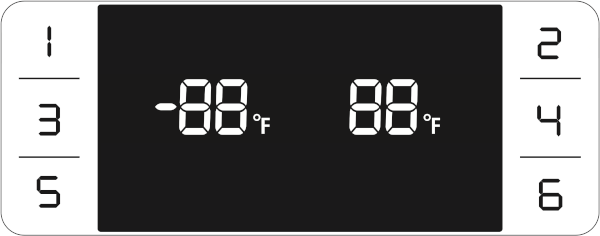
Activate
- Hold Button 1 and Button 2 simultaneously (8 seconds)
- The entire display will blink (6 seconds), keep holding
- Self-diagnostic mode will be activated with a Ding-Dong sound
- Any button inputs will not be recognized in self-diagnostic mode
- Any error code(s) will be displayed on the display panel LED(s) (30-50 seconds)
- If the display is blank there are no error codes (30-50 seconds)
Deactivate
- The display returns to normal function after 30-50 seconds
Check the database for error code meanings
Error CodesWhats in an Error Code
- Circuit-Level Fault Identification
- Error codes are typically tied to specific circuits
- Focused Direction for Electrical Testing
- Save time by focusing only on the failed circuit
- Rule out working components if no error code is stored
- Detection of Intermittent or Stored Error Codes
- Some failures may not be active during diagnostics
- Stored error codes can reveal prior faults
- Prevents Shotgunning Components
- Without checking codes, it’s easy to misinterpret symptoms
- Error detection can disable PCB power supply output circuits
Typical Systems Monitored by Samsung Self-Diagnostics
- Evaporator fan motor feedback
- Ice maker fan or ice room sensor faults
- Defrost sensor open/short conditions
- Ambient and compartment thermistor faults
- Communication errors between PCB modules
- Compressor/inverter faults
- Defrost heater circuit failures
Samsung Fridge Diagnostic Best Practice
Before removing panels or replacing parts:
- Enter the self-diagnostic mode to display error codes
- Record any stored or active error codes
- Reference the error code database or service document code definitions
- Perform targeted tests to confirm and repair the failure
Samsung refrigerators are highly control board-driven systems.
Using the onboard diagnostics will dramatically shorten troubleshooting time and increases first-call repair success.