If you’re staring at an Electrolux front-load washer that’s shutting down early with an E11 error code, chances are the water valve isn’t getting the signal (or power) it needs. This Tech Tip gives you a clear, repeatable way to check voltage right at the valve.
I’ve broken it down super simple so you can knock this out fast on your next call. Let’s get that machine back in service!
What Causes the E11 Error?
The control board is telling the washer to fill, but it’s not seeing the water level increasing in the tub. The fastest way to confirm is to check for 120 VAC at the valve during the diagnostic tests.
Models Covered
This procedure applies to:
- ELFW7637AT, ELFW7637AW, ELFW7537AT, ELFW7537AW
- ELFW7637BT, ELFW7637BW
- ELFW7437AW, ELFW7437AG
- EFLS627UIW, EFLS627UTT
Serial: All
Tools You’ll Need
- Digital multimeter (set to AC voltage)
- Needle leads (highly recommended — makes tight-pin checks much easier)
- Flat-blade screwdriver (for removing the valve cover)
- Good lighting and a camera/phone to document pin locations
Safety First (Quick Reminder)
Always unplug the washer before you remove panels or the valve cover. Once you’re in diagnostic mode and testing live voltage, keep your hands dry and work carefully around the connector.
Step-by-Step: Checking Voltage at the Water Valve
Step 1: Enter Diagnostic Mode
- Press Power to turn the machine on.
- Rotate the cycle selector ring (or repeatedly press the Cycles button) until Normal is selected.
- Press Start.
- Press Power to turn the machine off.
- Press Power again to turn it back on.
- Within 10 seconds, hold the Temp and Select (Set) buttons together for 3 seconds.
- You’re in diagnostic mode when the LEDs start blinking in sequence.
Step 2: Run Through Tests 1–6 and Check Water Flow
- Advance through the diagnostic tests. Listen or visually check for water flow.
- If low or no water flow is present on any of the tests, move to the next step.
- If water flow is good on all of the tests, this bulletin does not apply. Follow the E11 diagnostics in the service manual or tech sheet.
Step 3: Listen For a Humming Sound
- For each test that has no water flow listen for a humming sound, indicating the valve has sufficient power.
- If the valve that has no water flow is humming, move to step 8.
- If no humming sound is heard or you are unsure the valve has sufficient power, move to the next step.
Step 4: Set Up Your Meter
Set your multimeter to AC voltage.
Step 5: Remove the Valve Top Cover
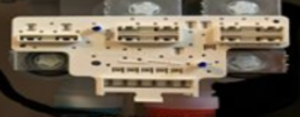
Use a flat-blade screwdriver to gently pry the cover open.
Important: Don’t lose the two small plastic rings — you’ll need them to snap the cover back on securely later.
Step 6: Set Your Neutral Lead
Place your black (negative) lead on Pin 9 — this is your common/neutral.
Step 7: Run Through Tests 1–6 and Check Voltage
Advance through the diagnostic tests (usually by pressing Start or the appropriate button). Keep your black lead on Pin 9 and check voltage on the pin listed for each test.
You should see approximately 120 VAC when the test for that valve is active.
| Test | Compartment | Valve Being Tested | Pins to Check | Notes |
|---|---|---|---|---|
| 1 | Pods | Pods valve | 1 & 9 | No test on 300 series |
| 2 | Wash | Hot valve | 3 & 9 | — |
| 3 | Bleach | Bleach valve | 7 & 9 | — |
| 4 | Softener | Bleach valve | 7 & 9 | — |
| 4 | Softener | Pre-wash valve | 11 & 9 | — |
| 5 | Stain | Pre-wash valve | 11 & 9 | No test on 300 series |
| 6 | Wash | Cold valve | 5 & 9 | — |
Pinout Quick Reference
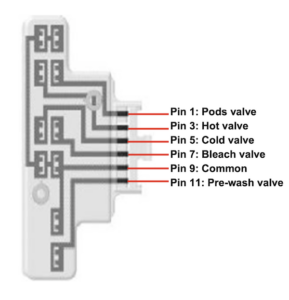
- Pin 1 = Pods valve
- Pin 3 = Hot valve
- Pin 5 = Cold valve
- Pin 7 = Bleach valve
- Pin 9 = Common (Neutral)
- Pin 11 = Pre-wash valve
Step 8: Voltage Present but Valve Not Working?
- Confirm good household water pressure is reaching the machine.
- Check the dispenser assembly for clogs or restrictions.
- If pressure is good and no restrictions → Replace the water valve assembly.
Step 9: No Voltage at the Valve?
Check the wiring diagram and confirm voltage is leaving the main control board at the correct connector.
Step 10: Still No Voltage from the Board?
Replace the main control board.
Step 11: Voltage at Board but Not at Valve?
- Unplug the machine.
- Inspect the harness between the board and valve for pinched, burnt, or damaged wires.
- Use your multimeter on ohms/continuity to test each wire end-to-end.
- Repair or replace the harness as needed.
Quick Decision Guide
| Reading | Next Step |
|---|---|
| 120 VAC present + valve hums | Problem solved — check water pressure & dispenser |
| 120 VAC present but no action | Replace water valve |
| No voltage at valve | Check main control board output |
| No voltage at board | Replace main control board |
| Voltage at board, none at valve | Inspect/repair wiring harness |
Final Tips
- Take a quick photo of the connector before you start — it helps if you need to reference it later.
- Always have the model-specific wiring diagram handy (it’s in the tech sheet).
- If the unit has good voltage and water pressure but still throws E11, the dispenser or valve itself is usually the culprit.
This check is one of the fastest ways to isolate whether you’re dealing with a bad valve, bad board, or wiring issue.
You’ve got this, techs! Go knock out that E11 and get the customer back up and running.